Chapter One: The Architecture of Starcraft Data Reference: TBL Edit NOTE: Merlin of Camelot Systems is currently doing a substantial overhaul of the entire Stardraft Program, including the CWAD Manager. This tutorial will thus be limited and only be a brief reference for the current version available now (which is 1.07 compatible for most people; and the CWAD Manager isn't version specific any ways, so it doesn't matter). Just keep in mind that by sometime next year, you will have a (possibly completely) different format for this tool.
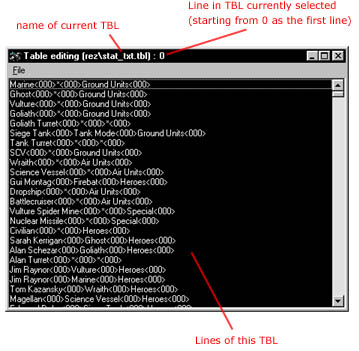
This is the TBL Edit plug-in program in the Stardraft CWAD Manager. It should be pretty simple considering that we've already gone over the format of TBL files. TBL Edit displays the list of lines in a TBL in order. It is useful to note that it displays the line number at the top. (You might also want to note that almost all references to lines in a TBL from other files start from 1, but TBL Edit starts counting from 0, so if you're having off by one problems when trying to connect to a certain line in the TBL, that is probably why -- just add 1 to the line TBL Edit give you) To edit a line in a TBL file, just double click on it.
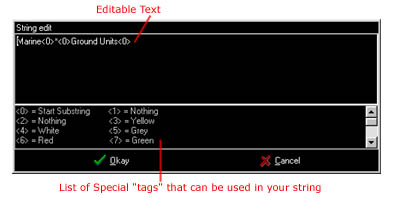
Simple enough. You may be wondering about those tags at the bottom. If you're familiar with hex editing and the trick to change colors of text in a SCM or SCX, then this should be familiar. These are those same hex bytes (ASCII values) that change the color of text, indent, center, or align certain text. To "get them to work" you basically place on of these tags before the text you want to be effected by them and everything after it will be altered by the tag. For example, if you place <7> before "Marine", then Marine will be displayed in a green color in the game. (Some of these values do different things depending on whether the text is displayed actually in the game or in a menu/mission briefing screen) The "Start Substring" special character (which is only used for unit names at the top) is mainly used on unit names to organize where they go in Staredit (the substring is not actually displayed). For example, the Marine is normally in the "Ground Units" section of Staredit Terran units. Substrings don't really have any effect in the game. Another thing you might notice in a couple lines is a single character (letter) in front of an otherwise recognizable string. For example: t<4>Research
S<3>t<1>im Pack Tech The character in front ("t" in this case) is the hot-key value that is associated with this string. So changing the character would change which key you needed to press if this string was associated with a button on a unit (which they usually are). This will not change which letter is highlighted in the actual string; as you can see above, you still have to do that visual effect manually by highlighting the "t" in the string with a color tag. The last thing I will mention in this small reference is that it is possible to add or remove lines from a TBL file (and, if you do it sensibly, Starcraft will be fine with it). In the File Menu of TBL Edit, you can export a TBL file as a TEXT file (and import TEXT as a TBL when you are finished). This basically translates the lines of a TBL file into an easily editable text file. You will notice that there is nothing special about the starting or ending lines; they all look essentially the same (format-wise). And they are. To add or remove a line, simple insert it somewhere (usually at the end of the TBL file, so you don't shift everything off by 1). Just make sure it looks like this: Your string text here<0> The <0> at the end of each line is what is called a delimiter, which basically tells where that line ends. Now, just import your edited text file back into a TBL with TBL Edit (warning: the TBL you currently have open when you import will be completely overwritten by your text file) and voila, TBL file with the lines you added, deleted, or modified. Easy as that. What is the utility of this? Later you will see that you can reference your new TBL lines in other files. By adding a new one, you don't have to replace any old strings. |